Advanced Training for WLOADCTL: Job Control By Condition

Overview
The condition attribute is one of the most powerful properties in WLOADCTL job scheduling. Combined with WLOADCTL's built-in functions, it unlocks a huge range of sophisticated scheduling logic.
In this article, we will introduce:
Why WLOADCTL introduced the
conditionattributeThe core technical concepts behind using
conditionThe most important real-world use cases for
condition
1. Why Does WLOADCTL Need a condition Attribute?
Rules are finite. Requirements are not.
WLOADCTL controls when and how a job runs through a variety of built-in properties, In previous articles, we already learnt about things like timingplan, maxnum, ignoreeer, period, lean, ostr. These properties cover a lot of ground, but in real business, things are more complicated. To handle this ever-changing control logic, WLOADCTL built a custom control mechanism through the condition attribute.
2. The Technical Fundamentals of condition
2.1 A First Look at condition Through Code
Let's start with a simple example:
<serial>
  <name>MainModul_SerialNode0</name>
  <sh>
    <name>job1</name>
    <progname>$TASKCTLDIR/demo/shell/job1.sh</progname>
    <jobdesc>Runs everyday</jobdesc>
  </sh>
  <!-- Relative to workdate1, runs every Mon, Tues, Thurs-->
  <sh>
    <name>job2</name>
    <progname>$TASKCTLDIR/demo/shell/job2.sh</progname>
    <condition>if(dayofweek() in (1,2,4)) CTL_DOIT else CTL_IGN</condition>
    <jobdesc>Runs every Mon, Tues, Thurs</jobdesc>
  </sh>
  <sh>
    <name>job3</name>
    <progname>$TASKCTLDIR/demo/shell/job3.sh</progname>
    <condition>if(execcmd('sh $HOME/myshell/myselfcondition.sh')==0) CTL_DOIT else CTL_WAIT</condition>
    <jobdesc>Wait myselfcondition.sh</jobdesc>
  </sh>
  <sh>
    <name>job4</name>
    <progname>$TASKCTLDIR/demo/shell/job4.sh</progname>
    <jobdesc>Runs everyday</jobdesc>
  </sh>
</serial>
Here's what's happening, step by step:
Dependency chain:
job1 → job2 → job3 → job4. All four jobs sit inside a single serial group, so by default they run one after another, each depending on the previous one finishing.job2's condition: Once
job1completes, control passes tojob2— butjob2carries acondition. If the current day is Monday, Tuesday, or Thursday, it runs; otherwise it's simply skipped.job3's condition: After
job2finishes (or is skipped), control passes tojob3, which also has acondition.job3only runs once the custom scriptmyselfcondition.shexecutes and returns0. Until then, the job — and the whole flow — sits blocked, waiting.job4: Once
job3completes,job4finally runs.
In this example, execcmd is a built-in function that executes a shell command and captures its return value. CTL_DOIT, CTL_IGN, and CTL_WAIT are WLOADCTL keywords used specifically within condition expressions.
2.2 The Basic Syntax of condition
(1) Core structure:
if ([Statement]) [Expression1] else [Expression2]
(2) Keyword actions
Inside the if / else structure of a condition, there are four primary keyword actions:
CTL_DOIT— Execute the current job.CTL_IGN— Ignore the current job (skip it, but treat it as successfully passed).CTL_WAIT— Wait (don't execute yet, and don't mark it as passed).CTL_FAIL— Mark execution as failed.
3. Key Use Cases for condition
condition is a fully customizable job control strategy with a wide range of applications. Below are three of the most common scenarios:
Controlling the triggering condition at the start of a workflow.
Controlling conditional branching within a workflow.
Implementing complex run control for standalone jobs.
3.1 Controlling the Start-Trigger Condition of a Workflow
Suppose you've defined a business sub-flow called mysubflow1:
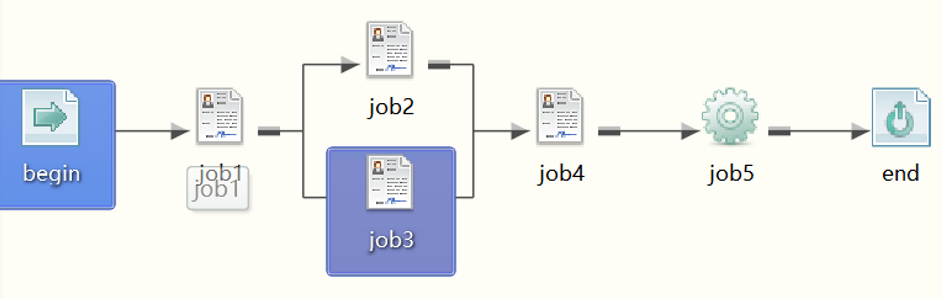
But when, and under what condition, should this sub-flow run each day? Considering a requirement: the flow should only run once a specific flag field in a specific database table reaches a certain value.
To handle this, we define a Main Flow that leverages the condition feature to implement the requirement. Here's how:
Because the triggering condition is highly specific to this business case, we first write a custom script, myctl.sh. This script's job is simply to check the database condition: if the condition is satisfied, it exits with 0; otherwise, it exits with 1.
Next, we create a Main flow:
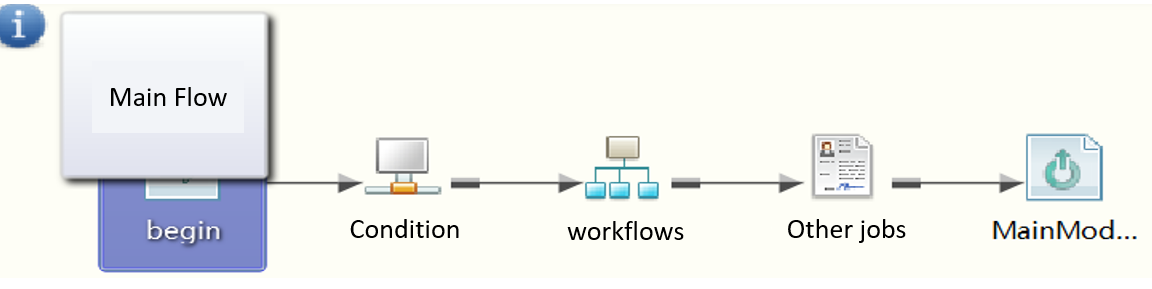
The code corresponding to this master control flow looks like this:
<serial>
  <name>root</name>
  <begin>
    <name>begin</name>
  </begin>
  <!-- Use a nulljob (empty job node) to control triggering -->
  <nulljob>
    <name>startctlnode</name>
    <condition>if(execcmd('sh $HOME/myctl.sh') == 0) CTL_DOIT else CTL_WAIT</condition>
    <jobdesc>My start trigger control</jobdesc>
  </nulljob>
  <!-- Calls my specific business sub-flow -->
  <flow>
    <name>callmyflow</name>
    <progname>mysubflow1</progname>
    <jobdesc>Call my business flow</jobdesc>
  </flow>
  <sh>
    <name>backdeal</name>
    <progname>$HOME/backdeal.sh</progname>
    <jobdesc>Do some follow-up processing</jobdesc>
  </sh>
  <end>
    <name>MainModul_endjob</name>
  </end>
</serial>
Here, startctlnode is a nulljob that gate execution. As long as myctl.sh doesn't return 0, the flow stays in CTL_WAIT and nothing downstream runs. The moment the database meet the condition, the gate opens, callmyflow triggers the actual business sub-flow mysubflow1, and backdeal.sh runs afterward for any follow-up processing.
3.2 Controlling Conditional Branches in a Workflow
Step 1: Understand the branching requirement visually
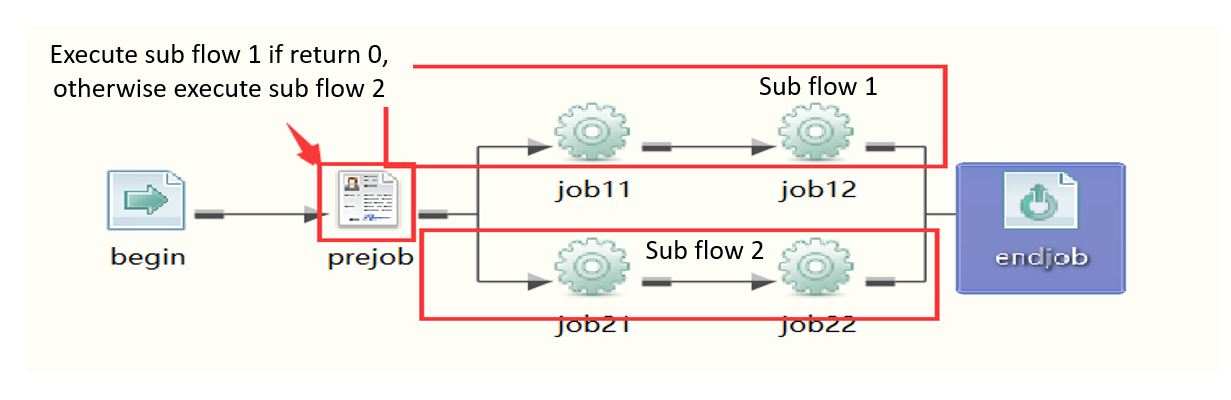
Step 2: The corresponding design code
<serial>
  <name>condition_app1</name>
  <sh>
    <name>prejob</name>
    <progname>$TASKCTLDIR/demo/shell/branchctl1.sh</progname>
    <para>$(retvalue)</para>
    <!-- Redefine return values: both 0 and 1 are counted as success -->
    <successv>0-1</successv>
    <errorv>2-98</errorv>
    <warningv>99</warningv>
  </sh>
  <parallel>
    <name>allbranch0</name>
    <!-- Branch 1 -->
    <serial>
      <name>branch1</name>
      <!-- getjresult is a built-in function that retrieves the job's return value -->
      <condition>if(getjresult('prejob')==0) CTL_DOIT else CTL_IGN</condition>
      <exe>job11</exe>
      <exe>job12</exe>
    </serial>
    <!-- Branch 2 -->
    <serial>
      <name>branch2</name>
      <!-- Run only if equal to 1, otherwise skip this branch -->
      <condition>if(getjresult('prejob')==1) CTL_DOIT else CTL_IGN</condition>
      <exe>job21</exe>
      <exe>job22</exe>
    </serial>
  </parallel>
</serial>
Here's the logic in plain terms:
prejobrunsbranchctl1.shand captures its return value via$(retvalue). Its success ranges from [0,1] (successv = 0-1), while2-98is treated as an error and99as a warning.allbranch0is aparallelcontainer holding two branches,branch1andbranch2, which are evaluated simultaneously.branch1only fires (CTL_DOIT) ifgetjresult('prejob') == 0; otherwise it's ignored (CTL_IGN).getjresultis a built-in function used to fetch a previously run job's return value.branch2only fires ifgetjresult('prejob') == 1; otherwise this branch is skipped entirely.
This pattern makes a single upstream job's return value cleanly steer execution down one of several parallel paths — a classic branching pattern for workflows that need different downstream handling depending on an earlier result.
3.3 Complex Run Control for Standalone Jobs
Beyond triggering entire workflows or driving conditional branches, condition is also frequently used for finer control of individual jobs. In fact, the two jobs (job2 and job3) shown in the very first example in this article are exactly this kind of use case: a day-of-week gate and a wait-on-external-signal gate, both applied directly to a single job rather than an entire flow.
Conclusion
The condition property makes WLOADCTL more programmable. Whether you need to control the entire workflow based on database flags, split execution into conditional branches based on upstream results, or add custom logic to individual jobs, when the condition property is used in conjunction with built-in functions, the process becomes more flexible and capable of meeting most of practical scheduling requirements.
You can try to write a condition statement on a demo in our Official Website
← Prev | lean, serial, and the ostr Mutual Exclusion Attribute